Restore
nBalance provides two flexible restore options to restore from backups. The Restore feature allows administrators to recover the system from a previously created backup. nBalance supports restoring the system either from a local restore point or by uploading an external backup file. During a restore operation, the system reverts to the selected restore point, replacing the current configuration and data with the backup state. This is typically used for system recovery, rollback after misconfiguration, or disaster recovery.
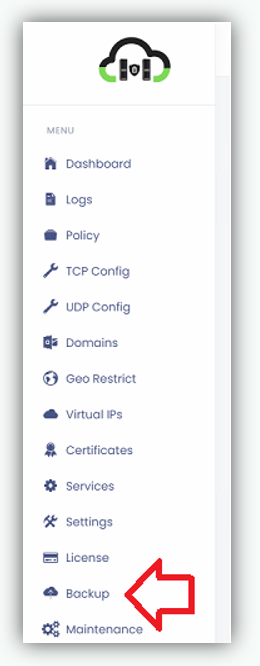
Navigate to Backup page.
Click Backup from the left navigation menu, will navigate to the Backup page.
1. Restore from Local Backup
This option allows you to restore the system using a previously created local backup stored on the system.
- Locate the required Restore Points list
- Click Restore Backup corresponds to the desired restore point.
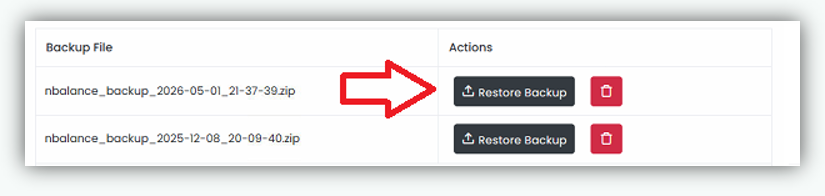
- Confirm the restore operation when prompted.
2. Restore from Uploaded Backup File.
This option allows you to restore the system by uploading an external backup file.
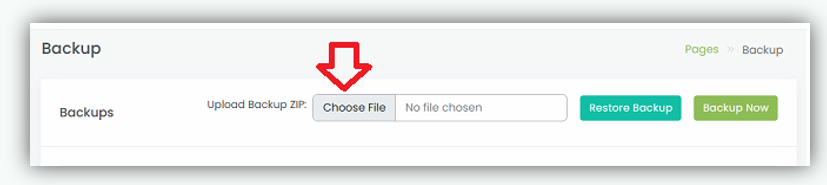
- Click Choose File under Upload Backup ZIP.
This opens a file selection dialog to choose the backup file.
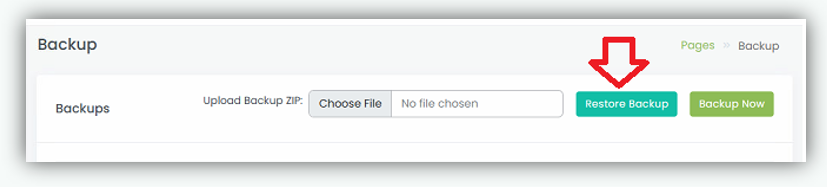
- Click Restore Backup to restore the system to the selected restore point.
Note
Restoring a backup will revert the system to the selected restore point and overwrite the current configuration and data.